Table of Contents: IT2 Transformer Guide
- A Smarter Foundation for Outdoor Lighting
- WiFi Control: Lighting from Anywhere
- Custom Programs for Personalized Environments
- Zoning: The Most Underrated Design Tool
- Power Meter Visibility: Smarter Load Management
- Naming Devices for Long-Term Clarity
- User-Friendly Dashboard & Smart Home Integration
- IT2 Transformer: Intelligent Lighting Made Approachable
- FAQs for IT2 Intelligent Transformers
IT2 Intelligent Transformers are the next evolution in landscape lighting, designed to go beyond simple timers and manual switches. Today’s systems need to look beautiful, adapt to seasonal and lifestyle changes, and offer convenient automation.
Built for this new era, the IT2 Intelligent Transformer streamlines installation, enables remote control, supports zoning, and allows custom scheduling—all without added complexity. Whether you’re a contractor specifying a system or a homeowner upgrading an existing setup, the IT2 delivers intelligent, user-friendly lighting control.
A Smarter Foundation for Outdoor Lighting
Traditional transformers convert household voltage down to safe low-voltage power, but the IT2 extends beyond basic power distribution.
It pairs with the itPRO app to give homeowners and installers full visibility and control over their system—including naming devices, checking wattage loads, configuring multiple zones, setting custom programs, and leveraging smart home integrations such as Alexa.
The result: outdoor lighting that feels refined, intentional, and modern.
Key Features at a Glance: IT2 Transformer
Beyond convenience, the IT2 improves how outdoor lighting is used, maintained, and expanded—giving homeowners smarter control and giving installers cleaner, more predictable jobs.
- WiFi Connectivity: The transformer connects to the home network, enabling continuous app-based communication and remote access.
- Remote Access & Control: Users can adjust schedules, check status, or activate lighting from anywhere with an internet connection.
- Custom Schedules & Programs: Personalized timing and automation options accommodate seasonal shifts, security needs, and lifestyle patterns.
- Zoning & Naming Options: Zones can be configured and labeled individually to match different areas, functions, or use cases across the property.
- Power Meter Visibility: Built-in watt load monitoring helps users and installers optimize energy usage and avoid overload.
- Alexa Integration: The system can connect with Alexa to enable voice-based activation and smart home routines.
- Streamlined Setup: The mount-download-connect workflow keeps installation simple without sacrificing smart functionality.
- User-Friendly Dashboard: The app interface offers quick access to controls, device settings, and zone management.
- Expandable System Design: The IT2 supports phased growth, allowing landscapes to evolve without replacing the core hardware.
These features add up to more than convenience—together, they create a lighting system that can adapt to seasons, curb appeal goals, holiday decor, safety needs, and lifestyle changes with little effort.
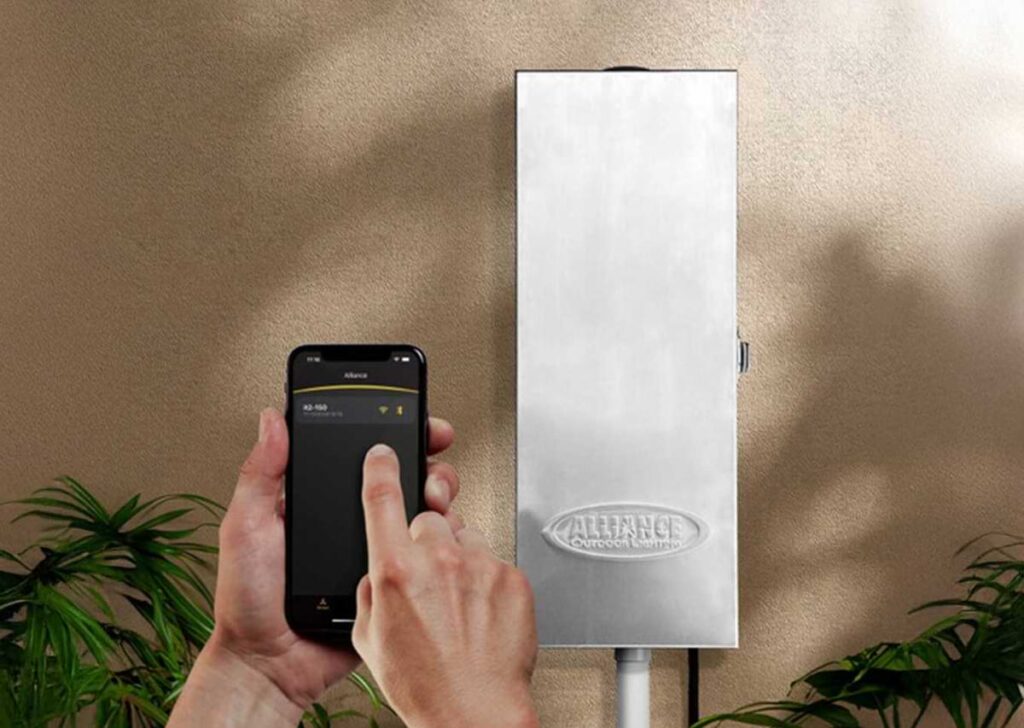
WiFi Control: Lighting from Anywhere
Remote control is one of the biggest upgrades modern transformers offer—and it’s especially useful outdoors, where seasonal changes can shift how and when lights should run.
With the IT2:
- Remote Activation: Homeowners can turn their lights on or off from anywhere in the world using an internet connection.
- Off-Site Troubleshooting: Contractors can verify lighting behavior and diagnose issues without needing to visit the property.
- Flexible Adjustments: Vacation schedules, events, or last-minute changes become simple and intuitive to manage.
- Adaptable Use Cases: Remote access supports everyday needs like curb appeal and security as well as temporary events such as hosting, holidays, or weather-driven changes.
Custom Programs for Personalized Environments
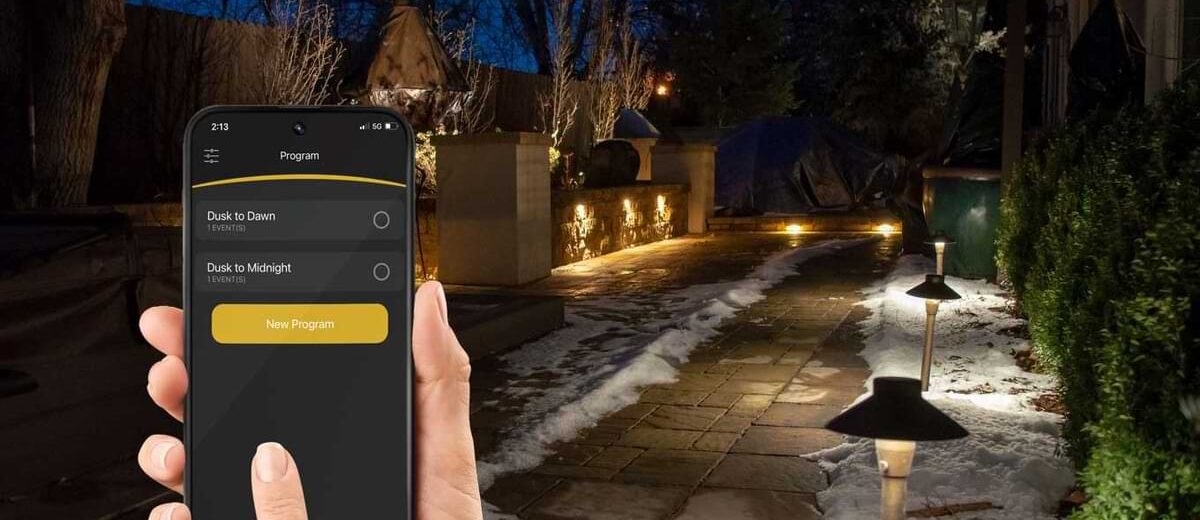
The IT2 allows users to program custom lighting schedules, tailoring scenes to time of day, lifestyle, and aesthetic goals.
Common examples include:
- Design Flexibility: Users can create programs such as dusk-to-midnight schedules for curb appeal or solar-based offsets that automatically adjust to sunset and sunrise.
- Seasonal Adjustment: Lighting can shift earlier in winter and later in summer without constant reminders or manual resets.
- Security Scheduling: Programs can simulate occupancy during vacations or absences to enhance home security.
- Event Lighting: Scenes can be tailored for gatherings, parties, or special occasions where more ambiance or brightness is needed.
- Automatic Operation: Unlike legacy timers, custom programs run automatically and adapt to environmental cues like solar events.
Zoning: The Most Underrated Design Tool
One of the biggest practical benefits of the IT2 transformer is zone control. Zones allow users to split lighting into independent circuits, creating distinct moods and functions across a property. A front yard may need subtle architectural wash lighting while a patio or pool area might call for higher output during gatherings.
Zoning makes it possible to:
- Multi-Area Control: Different areas—such as patios, pathways, trees, or gardens—can be illuminated at different intensities or times.
- Independent Brightness: Zones can dim or adjust brightness without affecting other parts of the landscape.
- Scheduling Freedom: Each zone can follow its own schedule based on use patterns, seasons, or homeowner preferences.
- Energy Optimization: Output can be reduced in zones that don’t require full illumination, conserving power and extending system longevity.
- Clear Identification: Zones can be named in the itPRO app for faster troubleshooting, easier scheduling, and long-term clarity.
Power Meter Visibility: Smarter Load Management
For contractors and advanced users, the built-in power meter is one of the most technical yet practical features of the transformer. It displays watt load availability, making it easier to verify whether the transformer is operating within recommended electrical limits.
This visibility helps with:
- Load Troubleshooting: Users can quickly diagnose performance issues and confirm whether a transformer or zone is overloaded.
- Overload Prevention: Monitoring watt consumption reduces the risk of exceeding transformer capacity and damaging components.
- Future Expansion: Contractors can plan for add-ons or upgrades without guessing how much capacity remains.
- Balanced Distribution: LEDs and accessories can be properly allocated across zones to maintain efficiency and reduce waste.
- Installation Accuracy: Reduced trial-and-error leads to more predictable job costs and a cleaner final install.
Naming Devices for Long-Term Clarity
The itPRO app allows users to name the transformer itself for easy ongoing identification—particularly useful for homes with multiple transformers or multi-zone landscapes.
This is especially relevant for:
- Large Properties: Estate homes benefit from labeled devices when lighting spans multiple zones or acreage.
- Multi-Unit Applications: Apartments, HOAs, and shared spaces gain clarity in long-term maintenance workflows.
- Commercial Sites: Hotels, retail landscapes, and corporate campuses require clear naming for consistency across teams.
- Phased Retrofits: Multi-stage installations are easier to track and expand when devices are properly labeled.
- Maintenance Efficiency: Good labeling prevents confusion during future adjustments, upgrades, or service calls.
User-Friendly Dashboard & Smart Home Integration
The app dashboard is intentionally streamlined to help homeowners navigate without technical frustration. From a single view, they can monitor zones, update schedules, or make quick adjustments.
For smart home enthusiasts, the IT2’s ability to integrate with Alexa adds voice convenience—turning zones on/off, activating groups, or running scenes without touching the phone.
Benefits for Homeowners & Installers Alike: Comparison Chart
The IT2 is built to satisfy both sides of the equation, offering everyday convenience and customization for homeowners while streamlining installation, troubleshooting, and system expansion for contractors.
| Benefit Category | Homeowners | Installers |
| Control & Convenience | Smarter control + remote access | Faster setup + fewer callbacks |
| Efficiency & Performance | Energy efficiency + system longevity | Visibility into loads + expandable design |
| Aesthetic & Safety | Safety + curb appeal | More professional end result |
| Scheduling & Automation | Flexible scheduling + automation | Minimal troubleshooting + easier maintenance |
IT2 Transformer: Intelligent Lighting Made Approachable
Outdoor lighting has always been about beauty and safety. The IT2 Intelligent Transformer simply brings those goals into alignment with how modern homeowners live—connected, customized, and effortless.
With WiFi features, zones, scheduling, naming, and smart home integration, the transformer becomes more than just a power source—it becomes the command center for a more thoughtful landscape.
FAQs for IT2 Intelligent Transformers
The IT2 is a smart landscape lighting transformer that combines low-voltage power with advanced features like WiFi control, zoning, custom scheduling, and smart home integration. It allows homeowners and installers to manage outdoor lighting more efficiently while enhancing convenience, aesthetics, and system longevity.
Installation is simple: mount the transformer, download and pair it with the itPRO app, connect to WiFi, and configure zones, schedules, and device names. This streamlined process keeps setup fast while giving homeowners and contractors full control over lighting behavior.
Yes! Once connected to WiFi, the IT2 can be controlled from anywhere using the itPRO app. You can turn lights on or off, adjust zones, set custom schedules, and even integrate with smart home systems like Alexa for voice control and automation.
Join our Insider list and check out the different lighting options that we have to offer.